Tuesday, October 22, 2013

Vintage Photo Frame

I made the frame for this picture in just a few minutes using the Old Secret designer pack by ButterflyDsign.  The little girl in the picture is my grandma Ila.  She was an incredible lady.

12x12 Sampler-017

The Old Secret designer pack is free until November 3, 2013, so be sure to grab it while you can.  If you like vintage, be sure to check out the other designer packs from ButterflyDsign as well.

Tuesday, October 15, 2013

Pyramid Santa Made With MMS4

One of the things you can make very easily with MyMemories Suite 4 is pyramid cards.  A pyramid card is made by layering an image so that each successive layer is smaller.  Here’s one I made yesterday evening.

DSCF2541w

The Santa image I used is from an old PcCrafter set.  Here’s a video tutorial I made showing how to make pyramid cards using MyMemories Suite 4.

Saturday, October 12, 2013

MyMemories, It’ Not Just For Scrapbooking!

So you say you’re not in to scrapbooking?  That’s OK. You can do a lot more than just scrapbooking with MyMemories Suite 4.  Here’s a card I made recently using the Soft Nostalgia digital paper pack, Bodacious Bloossoms cutting file and Fairy Wishes digital stamps from PaperWishes.  The rick-rack on the inside is one of many included embellishments in MyMemories Suite.

FairyCard1w  FairyCard2w

Some of the elements are printed on the background and others were printed separately and layered on top.  I really love that I can size everything to fit the card.  No more struggling to find a frame to fit a stamped sentiment or vise versa.

Sunday, July 21, 2013

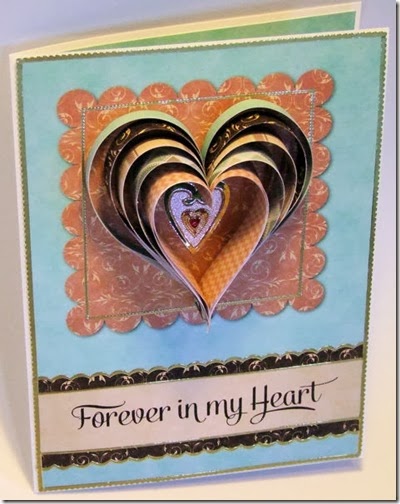
Forever In My Heart

Besides scrapbooks you can make lots of other things using MyMemories Suite 4.  Here’s a card I made with the HoneyChurch Layered Paper Hearts kit.
hearts20130721

The quick page I chose makes a heart that gets thicker toward the center.  The patterns and quick pages, when printed full size (8.5” x 11”), make a fairly large heart.  Since I wanted something I could put on a card, I reduced my chosen quick page 1/4 size.  I designed the front of the card in MyMemories Suite 4.  It was very quick and easy to do.  First I added a 4.75” x 6.5” rectangle and filled it with the Aqua paper included in the kit, then I added the shapes I wanted and filled them with paper.  When I was done, printed it, cut it out and added it to the front of a card blank. 

The instructions for the heart, posted on the MyMemories site say to print two copies, but if you want the paper to show on both sides, you will need to print four copies.  After cutting the strips out, arrange them in pairs, back to back so the color will show on both sides. 

After making the heart, I glued it to the front of the card, then I added a layered heart dazzle to the center and border dazzles along the edges.

If you’d like to purchase MyMemories Suite 4, be sure to use coupon code STMMMS97442 to receive $10 off the purchase price plus a $10 gift certificate to use in the My Memories online store.

Friday, June 7, 2013

Pretty Painted Piggies

Here’s a layout I created in MyMemories Suite 4 using pictures of my sweet little granddaughter and the new Serendipity digital paper pack from Hot Off The Press. 

12x12 Sampler-015

Isn’t she adorable?

I used the basic circle and scalloped circle shapes for the flowers and I used the photo shape tool to make round photos for the flower centers.   The font for the title is called Robot Teacher and the font for the journaling is CK Carefree from Creating Keepsakes.  Everything else except for the ribbons is from the Serendipity digital paper pack.

Monday, May 27, 2013

Attaching Text to a Shape in MyMemories Suite 4

The May challenge over at the MyMemories forum was to use the Attach to Shape feature on a layout.  I was almost too late to join in the fun, but I managed to find some time yesterday afternoon and put this page together:

12x12 Sampler-014

I attached the journaling to a tree shape from the Treedle Dee svg collection from Lettering Delights.  The combo pack I used for the papers and embellishments is Outdoor Adventure by Albums2Remember.

After I posted the layout, someone asked a question about attaching text to shapes, so I wrote up this quick tutorial.  Of course, I wrote it in MyMemories Suite 4!

Portrait 8.5 x 11-007

Portrait 8.5 x 11-008

If you’d like to purchase MyMemories Suite 4, be sure to use coupon code STMMMS97442 to receive $10 off the purchase price plus a $10 gift certificate to use in the My Memories online store.